

If you want to block ads on iPhone, we don’t blame you. They’re super annoying at the best of times, getting in the way of watching your favorite content on a mobile screen that’s already pushed for space.
It’s annoying that the iPhone’s built-in browser, Safari, only comes with a pop-up blocker and not an ad blocker. Thankfully, there’s still a way you can block ads on iPhone without purchasing third-party ad blocking software, and that comes in the form of Opera browser.
Opera is a free-to-download browser that, in my eyes at least, is a bit of a silent hero, as a lot of people still don’t seem to know it exists. I’ve been using Opera on my desktop devices for years now and absolutely love it.
So why Opera? It’s streamlined, reliable, beautiful and offers some really cool built-in features for desktop users, including social and messaging app extensions by default, a frickin’ free VPN and, as you may have guessed, pop up and ad blocking.
There’s also a crypto wallet feature, as well as a bespoke gaming version of the browser on PC and mobile called Opera GX. It’s no surprise that we put Opera browser on our list of the best ad blockers.
Now, the mobile version of Opera doesn’t feature the social extensions (which wouldn’t really make sense on a smartphone anyway). Unfortunately, it doesn’t feature the free VPN either. However, it does feature the ad blocker, allowing you to browse without intrusive adverts for free. In trying out Opera, you may also find you absolutely love it, and therefore come away with a shiny new browser to boast about to your friends and look niche.
If that all sounds good to you, here’s how to block ads on iPhone for free with Opera.
How to block ads on iPhone for free using Opera browser
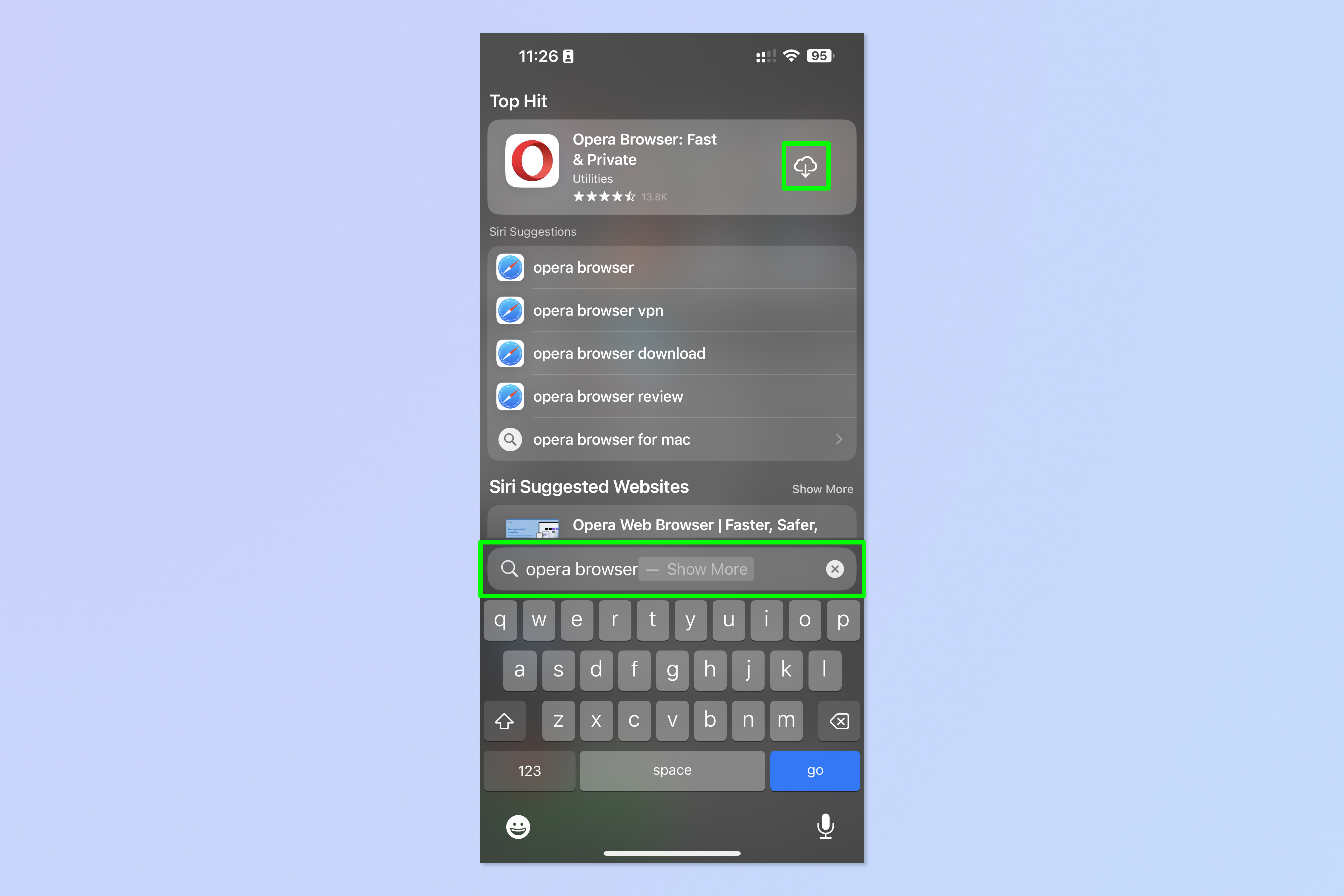
1. Swipe down on your Home Screen to open Search and type “opera browser”. Then tap the Get icon or the iCloud icon if you’ve already downloaded it in the past. Download the application.
2. Open the Opera browser. If this is your first time using Opera, tap Continue on the first welcome screen, then tap Next to agree to the data collection notice. On the next screen, toggle on Ad Blocking and tap Start browsing. And that’s it.
Note: you can change the data collection preferences in the Privacy Consent section of the browser settings later on. I’d advise you do this to limit what data Opera collects and uses.

3. If this isn’t your first time using Opera, or you want to change your ad blocking settings, tap the three lines icon in the bottom right of your screen, then tap Settings.

4. Tap Ad Blocking.

5. Toggle on Ad Blocking.

Consider those ads blocked. If you’d like more tips for using your iPhone, we have you covered with our wide range of tutorials. We can help you switch to a new iPhone with our guide on how to transfer data from iPhone to iPhone. We can show you how to speed up a sluggish iPhone with our tutorial on how to clear RAM on iPhone. And we can also show you how to give your contacts book a clean by teaching you how to delete multiple contacts on iPhone.